Run your AI model locally at no cost and create monster apps to change the world for free! Just follow these easy steps!
- Look at the price of various high-end gaming computers.
- Second guess your overall desired to even run AI models locally for free.
- Third guess yourself into buying a moderately priced laptop with RTX 4070 8GB GPU; if it does'nt work, at least I have Windows 11 laptop now, and my 15-year old desktop did just crashed pretty hard and can't run Windows 11 anyway.
- Procrastinate for 9 months.
- Watch some news where somebody's getting a billion dollars to be an AI expert and say "Why can't I get some of that money? I'd be fine with like a million dollars. That's like, so much less than a billion. I need to re-learn linear algebra."
- Watch one AI video and 423 YouTube shorts.
- Fire up the VS Code and here we go!

First you need an AI server like Ollama; a program that can download and run LLMs from the terminal and includes an API that I should probably look into because that's what all these VS Code extensions must be using.
Download/install it like any other program, open Terminal and give it the old "ollama --version" to see if it's there.
Now it's time to download some models. I heard about Qwen2.5-coder from AJ O'Neil over at
Javascript Jabber..
I decided to download models small enough to load entirely into my 8GB GPU memory, and luckily, most models come in different sizes. Many models have 7B parameter
versions, which is 4.7GB, then jump to 14B, which is 9.0GB. So 7B it is.
Download via terminal command: ollama pull qwen2.5-coder:7b
The internet said deepseek was good, and it has an 8B parameter model, so I got that too: ollama pull deepseek-r1:8b
Qwen2.5-coder:7b - first, as an aside; GPU is needed. I loaded qwen2.5-coder:7b up on a non-GPU laptop and it's pokey. But Qwen, I would say, is fast and useful in the terminal when run on a GPU. I gave it the prompt "What are the parameters for C function snprintf()?" and got expected results. "Make a Flappy Bird Game in Python." Got a Flappy Bird Game that marginally worked.
deepseek-r1:8b; with prompt "What are the parameters for C function snprintf()?" it kept going and going...and going in recursive self-doubt, never providing the answer. It did generate a Flappy Bird game, but it crashed after a second on an undefined reference error. So maybe deepseek-r1:8b knows Python a little, but C not so much.
Connecting AI Models into VS Code
First thing to do is make sure the number of context tokens for the model in question is large enough so the model can remember previous input when performing your requested operations.
Generally, for a VS Code integration, the internet recommends 8192-16384 for most tasks, so I went with 16384 via CLI commands:
Run the model: ollama run quen2.5-coder:7b
Adjust the context window: /set parameter num_ctx 16348
Save: /save quen2.5-coder:7b
Exit: /bye
To make sure the setting updated, you can show the model file in the CLI or export it and view via notepad++.
Show: ollama show --modelfile qwen2.5-coder:7b
Export: ollama show --modelfile qwen2.5-coder:7b > qwen_model_file
Then search for the num_ctx parameter.
The Extensions
I tried three AI extensions that work with VS Code; Continue Cline and Roo Code. All are installed in the normal fashion by clicking on Extensions in VS Code and searching. Once installed, they show up in the sidebar. When clicked, they expand out into a side pane. This is where the setup, chat window and AI output live. The extensions also allow direct reading/writing of files in the local project folder and occasionally prompt to run a terminal command. All the actions can be allowed or, by default, require you to click "Allow".
Continue
You can setup Continue with a config.yaml file that is stored (on Windows) in the Users\<user name>\.continue folder. The settings file can be opened in VS Code by clicking the Settings gear next to the agent name as shown. Also note the other settings icons above the chat window.
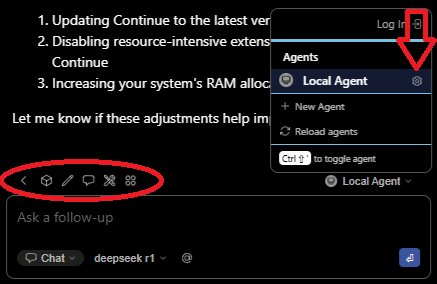
Here's my yaml file.
name: Local Agent
version: 1.0.0
schema: v1
models:
  - name: deepseek r1
    provider: ollama
    model: deepseek-r1:8b
    roles:
      - chat
      - edit
      - apply
  - name: Qwen2.5-Coder 1.5B
    provider: ollama
    model: qwen2.5-coder:1.5b
    roles:
      - autocomplete
  - name: Nomic Embed
    provider: ollama
    model: nomic-embed-text:latest
    roles:
      - embed
For the heavy lifting, I am using deepseek-r1:8b. For autocomplete, I'm using Quen2.5-Coder:1.5b because the internet said you don't need a big model for auto-complete. Finally, Nomic Embed is used for indexing your project, converting code into numerical vectors that the main AI model understands and uses as context along with your prompt; sounds like a blog in itself.
Well after all that I found something about the extension made things super slow. I switched it to qwen2.5-coder:7b , still way slow; thinking forever slow.
Go get a cup of coffee and bake a cake slow. So I asked the AI and one suggestion was to open the VS Code settings file and add
"vscode-continue.runInTerminal": true
This made it faster as now it just runs in the Continue terminal window, but it lost the ability to write files. It's basically like prompting
in a separate terminal window running Ollama CLI but a bit slower. So, got rid of that setting and now I have what is apparently known as a "ghost" setting.
Apparently it will be haunting me for the foreseeable future. Computers.
I did learn a new CLI command though: ollama ps
Typing this into a separate terminal window when Continue (or any of these extensions) is running a model will show some stats. Importantly, whether the
model is running 100% on the GPU or not. Turns out, deepseek-r1 gobbled up 13GB and was running 50/50 on the GPU and CPU. Strange as it's an 8B parameter model.
Qwen2.5-coder:7b used 7 GB, much less but also strange. What did I learn? Apparently the download size listed on ollama.com is not the running size.
A quick search revealed that, when running, KV cache (stores intermediate computations for the context window) can use a bunch of VRAM and scales with context
size. There's also temporary scratch buffers that can use up to a gigabyte of VRAM.
But let's go back the CLI for more strange. I ran deepseek-r1:8b in the terminal, opened another terminal instance and got the stats; 6.5 GB and 100% in VRAM. So I know math and 6.5 + 6.5 = 13GB. So is Continue running 2 instances of deepseek? Switched to qwen2.5-coder:7b; still 7GB, 100% VRAM. So Continue runs two instances of deepseek but only one of qwen2.5-coder? Can you run two instances? Well not if you open two terminal instances and run the model in both; still get 6.5GB running deepseek. How about qwen2.5-coder:7b. It's still 7GB. So in the CLI qwen2.5-coder:7b uses more VRAM when run than deepseek-r1:8b, even though deepseek-r1:8b has one billion more parameters. Does deepseek-r1:8b use VRAM more efficiently?. Finally, qwen2.5-coder:1.5b shows up randomly running (at 3.3GB VRAM), probably because I'm typing this blog in VS Code. Well, Continue is haunted there's no two ways about it.
Cline
Cline is pretty simple to setup with a couple clicks in the sidebar UI.
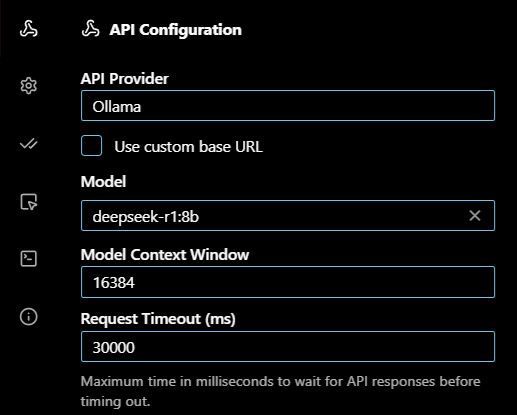
The bottom right corner of the extension has two buttons, Plan and Act. Act mode is what you want to generate code, so with deepseek-r1:8b, let's try "Make a Flappy Bird game in python. Put the code into main.py.". Seemed to get itself into a forever loop talking about Act mode, but I walked away for five minutes and came back to some code. I hit "accept" to save the code, but then the model output kept going; seemed to almost reset and start the process again. Terminated that and ran the code. No crash. Interestingly, the game looks different than the one generated via CLI; it's just a black ball on a white background that slowly falls unless you keep hitting the space bar.
Let's try qwen2.5-coder:7b. Interestingly, after starting the prompt, the Ollama server still shows
deepseep-r1:8b loaded. The status is "stopping", but it appears stuck. This is where, on Windows, the task manager comes in. Finding the ollama process,
it shows 2 instances of "Console Window Host", and I have two instances of VS Code open; coincidence? I closed both instances and a bit later both Console
Window Hosts disappeared. More learning! Ok, VS Code back up and let's make a game!...Ok, qwen2.5-coder:7b seems to have the opposite problem. It thought
for a little while and spit out a short plan of attack; now it's just sitting there. Hit it with my new favorite terminal command: ollama ps
And the model is unloaded. So quen2.5coder:7b acts orderly and shuts down nice, but did not produce a game. Tried the prompt again with the same result.
This time, I coaxed it along with a "Sounds like a plan, go ahead and make the game." For a moment, it looked like I might get some code, but then it
wrapped back around and spit out the plan again.
Roo Code
Roo Code has a similar UI to Cline. I selected deepseek-r1:8b. And here we go...Interestingly, my trusty "ollama ps" command shows the model using 24 GB, 100% CPU, so that's not good. Also interestingly, Task Manager shows ollama using a smidge less than 16GB. After five minutes of slow output it appears deepseek-r1:8b is stuck recursively reviewing the plan. Roo Code has a mode button in the lower left, which is definitely set to "Code". Ok, restart the laptop and open VS Code again...24GB. Ok, how about just using the CLI. 7GB and I get a Flappy Bird game in about 10 seconds or so...woops I used qwen2.5-coder:7b...who cares it's better anyway. But this time the game is a weird ASCII terminal app that prompts you to press 'w' to flap; but no crashes. And it's easy enough to change that to an 'f' for 'flap'. So a win.
I'm Giving Up
Well that was all around a disaster. Other than Flappy Bird, I had Roo Code going with qwen2.5-coder:7b and asked it to convert one of my Node.js apps to use ES modules and it basically failed. It could not handle multiple files well, so I tried file-by-file. Took longer than doing it by hand and had errors, so I ended up basically hand coding the change anyway. But I learned that these extensions might not interface with Ollama very well, so there's that. I learned a new shortcut to open Task Manager; why did it take me so long to figure ctrl + shift + esc out? So here I am in September and Windows 10 updates are going away and Micro Center has a RTX 5090 32 GB gaming desktop on sale for $4200. Is that a buy or run away?
Closing Thoughts
All the extensions integrate with the standard paid-for models that you can go get accounts for, and they all say to use them and not cut-down local models. So take my experience with a large grain of salt. Probably better to just link one of these extensions to a paid-for online model. But there is the allure of the $4200 RTX 5090 gaming desktop. If you have one of those, you should be able to run a bigger model and that might be just the ticket - but watch out for that extra overhead. As for me, I think a 4070 8GB gaming laptop is perfectly adequate to possibly learn more about how AI models work. I'd use qwen2.5-coder:7b for some of the questions I'd normally ask the free versions of various online models in the event that another tree blows over and takes out the power lines for 3 days, especially now that I have an inverter generator and portable power stations. I drive by a large tree everyday going to work, point at it and yell out the window "I dare you!".